ossclip.
A local-first CLI that turns a talking-head take into a finished short: filler words and dead air cut, word-timed kinetic captions, face-aware framing, and LLM-planned, code-rendered on-screen graphics — title cards, stat cards, diagrams, terminal and chat mockups — planned against a hand-built, Zod-typed scene library. Plus a cover image sized for the platform.
Your footage never leaves your machine. Transcription is local (whisper.cpp), rendering is local (Remotion); the only network calls are the LLM planning ones — on your own API key, or on your existing Claude Code subscription. One opt-in exception, off unless you configure it: remote transcription, for a machine whose CPU makes whisper the whole cost of a run.
Scope, honestly: ossclip is at its best polishing a take you have already cut down. For long-form input, --clip <seconds> selects the single strongest window (the producer's judgement, sentence-snapped) and produces only that — one clip, not N. Without it, 20 minutes in is a polished 20 minutes out.
AI can make mistakes: the cut, captions and graphics are generated — review the output before publishing.
working end to end · pre-1.0 ★ Star on GitHubLeft: the raw take. Right: what ossclip produce returns — this is the announcement reel, cut and captioned by ossclip itself. Starts muted; unmute for the audio, which is the produced cut.
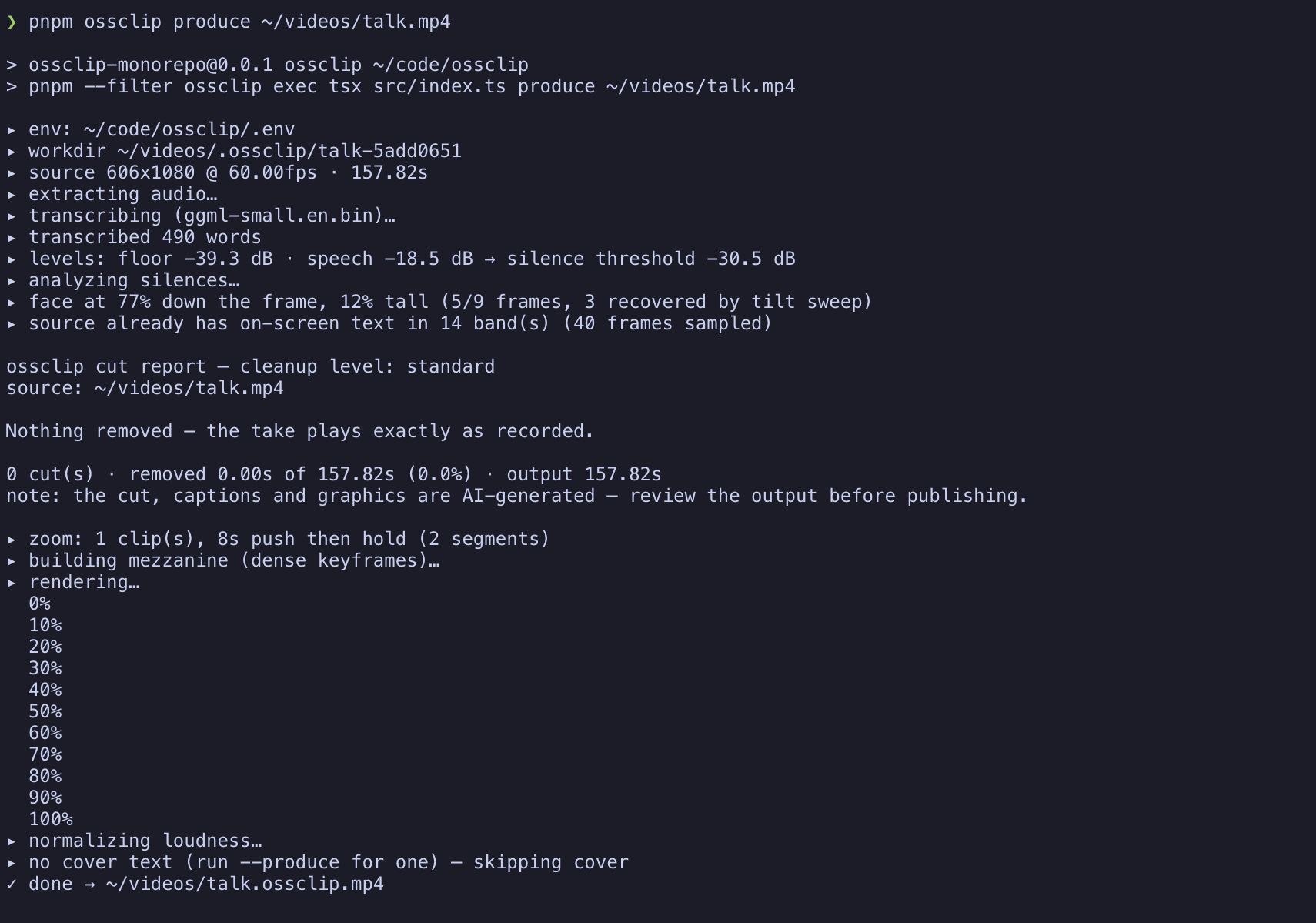
One ossclip produce run, end to end — every stage says what it did and why.
Install
Two commands, on macOS, Linux, or Windows (plain PowerShell — no WSL, no admin rights). The only prerequisite is Node ≥ 22 from nodejs.org.
npm install -g ossclip
ossclip setup
ossclip setup provisions everything into one folder (~/.ossclip): a static ffmpeg build, a prebuilt whisper.cpp whisper-cli (on macOS both come via Homebrew), and the transcription model — small.en, ~466 MB, the biggest piece of a ~600 MB total. It shows the plan with sizes and asks before downloading, resumes interrupted downloads, verifies checksums, and skips anything you already have — an ffmpeg already on your PATH stays yours. Paths are recorded in ~/.ossclip/config.json, so nothing edits your PATH. Uninstall = npm rm -g ossclip plus deleting ~/.ossclip.
Setup also offers to save an LLM key for --produce: a logged-in Google Antigravity (agy) or Claude Code CLI is detected automatically, or paste an ANTHROPIC_API_KEY or GEMINI_API_KEY. Skip it freely — cut + captions run fully local without one. If anything looks wrong later, ossclip doctor prints a line per prerequisite and the exact fix.
Licence note, since setup downloads binaries: the static ffmpeg builds it fetches (BtbN) are GPL, downloaded onto your machine at your request — nothing GPL ships inside the MIT npm package.
Manual install (if you'd rather own the toolchain)
brew install ffmpeg whisper-cpp        # macOS; Linux/Windows: ffmpeg from your package manager,
                                       # whisper-cli from https://github.com/ggml-org/whisper.cpp/releases

mkdir -p ~/.ossclip/models
curl -L -o ~/.ossclip/models/ggml-small.en.bin \
  https://huggingface.co/ggerganov/whisper.cpp/resolve/main/ggml-small.en.bin
ossclip doctor checks all of it — with the per-platform command for anything missing. Binaries can live anywhere: point OSSCLIP_FFMPEG / OSSCLIP_WHISPER (or config.json) at them. Setup and manual install compose — setup only ever fills the gaps doctor would flag.
small.en is the default. A mistranscribed word ends up in your captions and on a graphic, so accuracy beats speed here — and --produce runs a repair pass over the transcript before anything is drawn. ossclip setup --model <name> downloads base.en (~142 MB) or medium.en (~1.5 GB) instead.
Non-English footage works too: drop any converted whisper.cpp GGML model (Hugging Face fine-tunes included) into ~/.ossclip/models and it's usable by name — the wizard lists whatever is installed — with --whisper-language ur|de|auto so a multilingual model decodes its own language. RTL captions (Urdu, Arabic, Hebrew) lay out right-to-left with the word highlight following spoken order, field-proven on a real Urdu run.
Quick start
# The whole thing: cut + captions + LLM-planned graphics + cover
ossclip produce input.mp4 --produce -o out.mp4

# Just the cut and captions — no LLM, no network
ossclip produce input.mp4 -o out.mp4

# See what would be cut and why, without rendering
ossclip produce input.mp4 --no-render

# Long-form in, one short out: the strongest ~60s window
ossclip produce podcast.mp4 --produce --clip 60 -o clip.mp4

# Keep your own editor: export the planned cuts as labelled markers — no LLM, no render
ossclip analyze input.mp4 --format premiere-xml   # Premiere Pro
ossclip analyze input.mp4 --format resolve-edl    # DaVinci Resolve (coloured)
ossclip analyze input.mp4                         # Final Cut Pro (fcpxml)

# A folder of clips: sorted (--sort name|mtime), normalized, concatenated, produced as one
ossclip produce ./clips --produce -o out.mp4

# Check the whole toolchain first
ossclip doctor

# Open the editor over what a run produced (bare `edit` opens a project picker)
ossclip edit "<work directory>"

# Landscape (YouTube/desktop) instead of the 9:16 default
ossclip produce input.mp4 --produce --aspect 16:9 -o out.mp4
Tutorials
Four walkthroughs, one per use case. Each is the shortest honest path — real commands, what you'll see, and the trap you'd otherwise hit. All of them assume install is done and ossclip doctor is green.
1 · Your first short
You have a talking-head take (30–70 s is the sweet spot). You want the finished vertical short.
# The whole pipeline: cut, captions, graphics, cover
ossclip produce take.mp4 --produce -o short.mp4- The run narrates itself: transcription, the measured silence threshold, every cut with a reason, the LLM's beat sheet, then the render. The same account is written to
report.txtbeside the video. - First runs are dominated by the render — measured at ~85% of wall time. A 7-minute take is roughly a coffee; re-runs answer from the work directory's cache and are near-instant.
- When it finishes you get
short.mp4, a cover JPEG, and an offer to open the editor. Take it: drag what the cut got wrong, retype a caption, delete a scene — your edits live inoverrides.jsonand survive every re-run — each anchored to the words it was made against, so it follows its moment even when a re-plan renumbers the scenes.
--produce. Cut + captions run fully local, no network. And if you're unsure of any flag, run bare ossclip — the wizard asks, then prints the exact command it's about to run, which is also how you learn the flags.2 · Keep your own editor: the cuts as markers
You (or your editor) already cut in Premiere, Resolve, or Final Cut, and want ossclip's analysis without its rendering. analyze runs the pipeline to the cut report — no LLM, no render, roughly transcription time — and writes a marker file. Every marker is a span: where the cut starts and where content resumes, named like silence -1.77s (conf 0.95). Nothing is applied for you.
ossclip analyze take.mp4 --format premiere-xml   # Premiere Pro
ossclip analyze take.mp4 --format resolve-edl    # DaVinci Resolve
ossclip analyze take.mp4                         # Final Cut Pro (fcpxml)
The format choice is the feature — these three are not interchangeable: Premiere does not read modern fcpxml at all, and Resolve's fcpxml import silently drops markers.
- Premiere: File → Import → the
.xml; relink the media if it shows offline. Markers arrive at the sequence level and on the clip itself — the clip-level ones are anchored to the footage, so they stay on the right words through your own razor cuts and ripple deletes. Work clip-markers-first if you remove as you go. - Resolve: get the timeline in however you like, then Media Pool → right-click the timeline → Timelines → Import → Timeline Markers from EDL → the
.edl. Colour-coded: silence Blue, pause Sky, filler Yellow, retake Red. (Plain File → Import conforms the EDL into a new timeline of one-frame clips — wrong menu, known trap.) - Final Cut: File → Import → XML.
pause 0.40s (kept)) — so a gap you can see in your waveform is never unexplained. Say a marker word on camera (--blooper-marker blooper) and flubbed takes arrive marked too.3 · One strong short from a long take
Twenty minutes of podcast in, one ~60-second short out — the window chosen editorially, not by trimming from the front.
ossclip produce podcast.mp4 --produce --clip 60 -o clip.mp4- The producer picks the strongest ~60 s in the same editorial call that plans the graphics, snapped to sentence boundaries. The report says which window, its share of the take, and the model's stated reason — a tool that discards 19 of 20 minutes owes you that account.
- The chosen window is pinned into
command.json, so the editor's re-render replays the same window with zero LLM calls — it can never drift to a different clip between renders. - One clip, not N — multi-clip is not built. A source already at or under the target just produces whole.
4 · Non-English footage
Any converted whisper.cpp GGML model works, Hugging Face fine-tunes included. Urdu, field-tested end to end:
# 1. Drop the model into the models folder (any GGML fine-tune)
curl -L -o ~/.ossclip/models/ggml-medium-urdu.bin <model URL>

# 2. Name the model AND the language — both flags matter
ossclip produce take.mp4 --whisper-model medium-urdu --whisper-language ur -o out.mp4- Don't skip
--whisper-language: whisper defaults to English decoding, and a multilingual model forced through English produces garbage, not a warning.autoworks when the take mixes languages. - RTL captions (Urdu, Arabic, Hebrew) lay out right-to-left with the active-word highlight following spoken order.
- The work directory records which model and language wrote its transcript — switching models re-transcribes instead of silently serving the cached English text, so A/B-ing
base.envssmall.envs a fine-tune on your own footage is just re-running with a different--whisper-model.
5 · A weak CPU: transcribe somewhere else
Transcription runs on your machine by default, and nothing here changes that. But on an older CPU whisper is the dominant cost of a run — minutes of decode per minute of video — so ossclip can post the audio to any OpenAI-compatible /v1/audio/transcriptions server instead. Groq has a free tier with word-level timestamps that covers any realistic creator volume:
# 1. Get a free key at console.groq.com
export OSSCLIP_WHISPER_URL=https://api.groq.com/openai/v1
export OSSCLIP_WHISPER_API_KEY=gsk_...

ossclip produce myvideo.mp4- Configuring the URL is the whole switch — every run then transcribes remotely, and
--whisper-backend localopts a single run back out. The durable spelling is"whisperUrl"in~/.ossclip/config.json(with"whisperRemoteModel"for the model name, defaultwhisper-large-v3-turbo); the key stays environment-only, like every secret. With a server configured,ossclip doctorandossclip setupstop asking for whisper.cpp and the model file — neither is needed. - Self-hosted works and needs no key: speaches, a whisper.cpp server, anything speaking that API shape. It must answer
response_format=verbose_jsonwithtimestamp_granularities[]=word— ossclip's cuts, captions and zooms are all word-stamp driven, so a text-only answer is an error, not a degraded success. - One file per run, ~24 MB. The upload is a 32 kbps opus sidecar, about 100 minutes of speech under the cap. A longer take errors before anything is uploaded, naming the size; transcribe it with
--whisper-backend local, or split it. - Your audio leaves the machine on this path — that is the trade. The local backend is the default precisely because it is the private one.
How it works
- Transcribe & repair — whisper.cpp locally, then an LLM pass that fixes mishearings (
cloud code→Claude Code) under a strict gate: a rewrite is refused, a mishearing is fixed, and every repair is logged with what was heard. - Cut — silences and fillers go by measured thresholds (
--cleanup exact…aggressive); the report says what was cut and why. - Captions — word-timed kinetic captions with an active-word highlight, routed around the platform's safe areas, the active graphic, and any text burned into the source.
- Producer — the LLM plans a beat sheet and scenes against the component library, steered by a measured framing brief (a wide band never lands on a close-up), grounded against the transcript so a stat it prints is a stat that was said.
- Verify — layouts that would crop the head are repaired, graphics route around the source's own on-screen text, on-screen copy is reconciled with the captions.
- Render — Remotion, locally, plus a cover JPEG at the OUTPUT's aspect: 9:16 framed for the profile grid's square crop, 16:9 framed as a thumbnail shown whole. With
--producethe cover carries the hook text; without it, the sharpness-scored face frame ships on its own.
The work directory
Every run writes <input dir>/.ossclip/<name>-<hash>/ — the hash is of the source's CONTENT, so the same footage reuses its cache (rename it and you still land in the same place; --workdir starts a separate project, deleting the directory forces a clean run): the transcript, the analysis, production.json, render-props.json, report.txt, usage.json, the cached LLM plan, and command.json — the recorded invocation the editor's Render button replays. It is a cache: delete it to force a clean run; keep it and re-runs are near-instant.
Each run appends to usage.json — one entry per run with its provider, models, tokens and cost — and stamps the same provenance onto production.json, so a workdir always says who planned it even when a later run answers entirely from cache.
overrides.json — a file the producer never writes. Re-running produce re-plans the video and keeps your edits. Re-rendering from the editor replays the same configuration as the recorded run — flags, aspect, and provider (the resolved provider is pinned into command.json, so an env-detected choice can't drift).Models & cost
Without --llm, ossclip picks: the Google Antigravity CLI (agy) → the Claude Code CLI (both subscription auth — plan usage, not API credits) → GEMINI_API_KEY → ANTHROPIC_API_KEY. Calls are tiered: editorial judgement (the beat sheet, transcript repair) goes to the main model; mechanical calls go to a smaller sibling.
▸ llm: 3 calls · 130,749 in / 8,321 out tokens · ~$0.72 of API-rate work, covered by the subscription · 92sReported token counts are exact where the provider reports them and marked (est) where derived; a model with no known price gets tokens and no cost guess. Per-call breakdown in report.txt, raw records in usage.json.
Editing
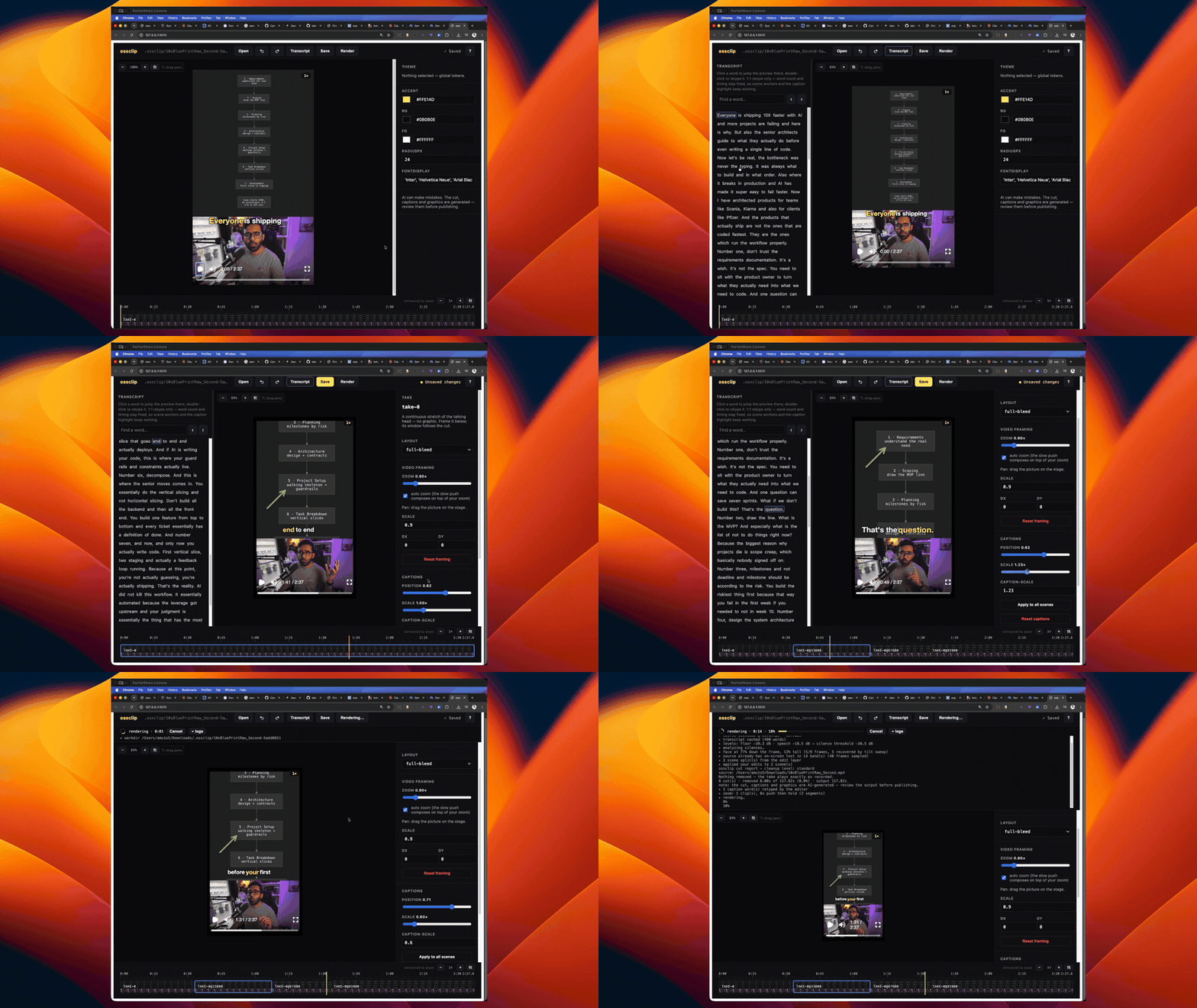
Select, drag, retype — every edit lands in overrides.json, which the producer never overwrites, anchored to the words it was made against.
ossclip edit "<work directory>"     # opens http://127.0.0.1:5174
ossclip edit # bare: pick from recent projects, or browse--sfx run every planned placement is a diamond: drag to retime, swap the sound, set a per-placement gain, Hear it before committing. Deleting a planned sound leaves a restorable ghost; the palette adds your own at the word under the playhead. They play in the preview on the player's own clock..cube from ~/.ossclip/luts, Off, or your config's Default — plus intensity, exposure, temperature, saturation, contrast. Presets preview live; a LUT bakes in at render time and the panel says so instead of faking it.ossclip publish panel with checkboxes: pick accounts, per-platform captions, YouTube privacy, schedule or send. Channels the video is too long for are grayed out with the cap named. See publish.Keybinds
Press ? in the editor for this list in-app.
transport
| space | play / pause |
| J / K / L | reverse · pause · forward (tap again to speed up) |
| ← / → | step one frame back / forward |
| ⌘/ctrl + ← / → | jump to and select the previous / next scene |
selection
| click | select scene or element |
| ⌥ + ← / → | select previous / next scene |
| esc | clear selection · close dialogs |
editing
| ⌘/ctrl + B | split the scene at the playhead |
| delete / backspace | delete the selected scene (restorable) |
| ⌘/ctrl + Z | undo |
| ⌘/ctrl + ⇧ + Z | redo (⌘Y works too) |
| ⌘/ctrl + S | save |
| double-click caption word | retype it in place |
| drag element / corner handles | move · resize |
| drag picture | pan the video framing |
view
| ⌘/ctrl + scroll on preview | zoom the view (never edits) |
| ⌥-drag / middle-drag | pan the zoomed view |
| ⌘/ctrl + scroll on timeline | zoom the timeline |
| ? | the in-app reference |
Scene components
Every component sizes its type to the slot it is given (nothing overflows the platform-safe area), animates in with a staggered rise, and leaves through a uniform exit fade. All text on them is editable in place.
Layouts
Layout places the video; the component always renders. Portrait (9:16) and landscape (16:9) each get frame-appropriate geometry — the split axis follows the frame's long edge.
| layout | arrangement |
|---|---|
| full-bleed | the talking head, full frame |
| blurred-behind | speaker blurred and dimmed behind a centred graphic |
| video-top | video band on top, graphic below (portrait) |
| pip-bubble | big graphic + the speaker in a round bubble (roundness and placement editable per scene) |
| graphic-only | the graphic owns the frame |
| lower-third | picture whole, card in the bottom band (broadcast lower third) |
| split-left / split-right | speaker fills one half, graphic the other (landscape; stacks in portrait) |
produce flags
| --produce | run the LLM producer brain. Without it: cut + captions only |
| --clip <seconds> | produce only the strongest ~N-second window of a long take, sentence-snapped (requires --produce; a short-enough source is produced whole). The report says what was chosen and why |
| --intent "<text>" | what the video should be — steers the producer's editorial choices |
| --speaker "<who>" | who is on camera — helps repair recognise a mangled name |
| --cleanup <level> | exact | light | standard | aggressive — how hard to cut silence and fillers |
| --aspect <ratio> | 9:16 (default) or 16:9 — landscape export with landscape-native layouts |
| --source-fit <mode> | cover crops to fill; contain shows the whole frame inset — the landscape-source escape hatch |
| --resolution <height> | 1080 (default) | 1440 | 2160 | auto — auto keeps the pixels a 4K source still has after the crop, never under 1080p, capped at 2160. Config key "resolution" |
| --color-grade <look> | a preset (talking-head | teal-orange | filmic-fade | cwa | punchy | mono) or a .cube LUT filename from ~/.ossclip/luts. --no-color-grade is a hard off. See Color grading |
| --sfx / --sfx-level <level> | sound effects on the producer's beats — subtle | normal | meme (--sfx-level implies --sfx; requires --produce). See Sound effects |
| --youtube / --no-youtube | a YouTube pack beside the video: SEO title options, description, hashtags and tags in <out>.youtube.md, plus an AI thumbnail (<out>.thumbnail.png) whose concept you approve before the render. Brings its own LLM provider, so it works without --produce. Config key "youtube" |
| --portrait <path> | your portrait photo, the likeness reference for the --youtube thumbnail. Without one (or without a GEMINI_API_KEY) the frame-grab cover stands, and the run says which was missing. Config key "portrait" |
| --audience <text> | who watches the channel — steers the pack's titles and tags and the thumbnail's concept. Config key "audience" |
| --thumbnail-brief <text> | a standing instruction the thumbnail concept must honor, e.g. "always show the terminal, never stock imagery". Config key "thumbnailBrief" |
| --cover-in-video | overlay the cover on the opening frames, for the platforms that ignore an uploaded cover and use frame 1. Nothing is inserted — the overlay ends at the first spoken word, so no timing moves. Off by default; "coverInVideo": true defaults it on, --no-cover-in-video still wins |
| --llm <provider> | antigravity | claude | claude-cli | gemini | mock |
| --llm-model / --llm-fast-model | override the editorial / mechanical model (same disables tiering) |
| --llm-effort <level> | low | medium | high — reasoning effort, on the antigravity provider only |
| --whisper-model <name> | transcription model for this run (base.en | small.en | medium.en, or any converted GGML model in ~/.ossclip/models) |
| --whisper-language <code> | language for a multilingual model, e.g. ur | de | auto (whisper defaults to en) |
| --whisper-translate | English captions from non-English speech — whisper translates instead of transcribing verbatim (its -tr). Pair with --whisper-language for the SOURCE language. Local backend only |
| --dictionary <terms> | comma-separated terms of art the speaker uses ("JSON, ossclip, Genkit") — biases transcription toward these spellings, vouches them for repair, canonicalizes their casing in captions. Replaces the config's dictionary for the run |
| --whisper-backend <where> | local (default) or remote — post the audio to an OpenAI-compatible server instead of decoding it here (weak-CPU tutorial). Configuring the URL already implies remote, so this flag is mostly local, the per-run opt-out |
| --no-repair | skip the ASR mishearing repair |
| --scenes <path> | hand-authored scenes JSON — no LLM in the loop |
| --source-is-edited | the source already has burned-in graphics — keep ossclip's off them (also what turns the source-text scan on) |
| --blooper-marker <word> | say the word on camera and the flubbed take is cut, back to the start of the sentence it spoiled. Matching is fuzzy (edit distance), so a mishearing like looker still counts — every fuzzy hit is named in the report. Off unless given |
| --collapse-retakes | legacy no-op, kept parseable for recorded-run replays. Retake collapsing — consecutive near-identical sentences reduced to the last complete attempt, every kept/cut decision named in the report — runs automatically with --blooper-marker; no marker, no retake cuts |
| --sort <order> | folder input only: name (default, plain codepoint sort, matches ls) or mtime (oldest first) — the concatenation order |
| --watermark / --no-watermark | opt-in credit: a small "made with ossclip" wordmark in the top-left safe area. Off by default; "watermark": true in config.json defaults it on, a typed --no-watermark still wins |
| --no-captions | no burned-in captions — everything else intact. The CTA keyword styling rides the caption track, so it goes too |
| --no-jump-cuts / --add-jump-cuts | the subtle punch-in zooms that conceal jump cuts, off or forced on. Narrower than --no-zoom; a screen share is never punched either way |
| --no-zoom | static camera: no idle push, no cut punch-in — for close framings where any motion crops the head. Per-scene control stays in the editor |
| --noise-db <db> | override the measured silence threshold, e.g. -30 |
| --no-cover / --cover <path> | skip, or redirect, the cover image |
| --cover-text-reset | use this run's generated cover headline even if ossclip cover --text set one — that headline is user-owned and kept by default |
| --review | produce without rendering, then open the editor to review the cut before rendering once |
| --open-editor / --no-open-editor | open the editor when the run finishes (or never ask), on --editor-port |
| --concurrency <n> | how many browser tabs render frames in parallel (default: CPU cores − 2, floor 2). Turn it DOWN if the render logs a browser crash — that is memory, not one bad frame |
| --no-render | stop after writing the props |
| --workdir <dir> | where the cache lives |
That is the list worth typing. The debug and replay flags — --transcript, --no-mezzanine, --force-component, --clip-window, and the positive halves that exist only so a recorded run can pin its own state — live in ossclip produce --help, which is always complete.
Color grading
Two engines behind one flag. A preset — talking-head, teal-orange, filmic-fade, cwa, punchy, mono — is parametric and rides the render props as an sRGB filter, so the editor's player previews exactly what renders. A .cube LUT you drop in ~/.ossclip/luts is baked into the mezzanine by ffmpeg instead; its filename carries the LUT's hash, so a warm work directory can never hand you ungraded frames. LUT grades therefore apply on the next render and the editor says so rather than faking a preview no render would match.
ossclip produce take.mp4 --produce --color-grade cwa
ossclip produce take.mp4 --produce --color-grade kodak-2383.cube
ossclip produce take.mp4 --produce --no-color-grade      # hard off, even if the config sets one
The editor's Color section (no selection) picks the look for the whole video and exposes intensity, exposure, temperature, saturation and contrast. Precedence: overrides.json (what you set in the editor) beats --color-grade/--no-color-grade, which beats "colorGrade" in ~/.ossclip/config.json — {"preset": "cwa"} or {"lut": "kodak-2383.cube"}, plus the same optional tweaks — which beats off. An unknown preset or a missing LUT earns one warning naming the layer it came from, and the run proceeds ungraded.
Sound effects
--sfx places sounds on the beats the producer planned — so it needs --produce; without it the run warns and stays silent. --sfx-level sets how much: subtle, normal (the default), or meme, which is the only level that unlocks the meme-tagged sounds (record scratch, tape stop, dramatic boom). The level is also the density budget — 2, 4 and 8 placements per minute — and unknown ids, out-of-range anchors and anything under 1.5 s apart are dropped deterministically after the model answers, never clamped.
ossclip produce take.mp4 --produce --sfx
ossclip produce take.mp4 --produce --sfx-level meme      # implies --sfx
The library is a bundled CC0 starter pack (whooshes, a riser, ding, pop, click, error buzz, plus the meme three). Your own packs live in ~/.ossclip/sfx/<pack>/pack.json — a whenToUse line per sound, which is the menu entry the model plans against — and a user pack beats the bundled one on a shared id. "sfxBundledPack": false in ~/.ossclip/config.json takes the starter pack out of the menu entirely, for someone who wants only their own sounds. "sfx" and "sfxLevel" are the config keys for the flags themselves.
Placements are anchored to words, not timecodes, so they survive the next re-cut — and the editor owns them from there: see the SFX lane in Editing.
analyze — cut suggestions in your own editor
For editors who already have a workflow and just want the analysis: ossclip analyze <input> runs the pipeline up to the cut report — no LLM, no render, so it finishes in roughly transcription time — and writes a marker file your NLE imports. Every marker is a span covering the whole suggested cut (where it starts and where content resumes), named in the report's vocabulary: silence −1.77s (conf 0.95). Nothing is cut for you — they are labels to review. Pauses the analyzer detected but kept export too (pause 0.40s (kept)), so a gap you can see in your waveform is never unexplained.
Each NLE reads a different dialect — Premiere does not read modern fcpxml at all, and Resolve's fcpxml import silently drops markers — so pick the format for yours:
| format | for | how to import |
|---|---|---|
| --format premiere-xml | Premiere Pro | File → Import → pick the .xml; relink the media if it shows offline. Markers land at the sequence level and on the clip — the clip-level ones are anchored to the footage, so they survive your own razor cuts and ripple deletes |
| --format resolve-edl | DaVinci Resolve | import the timeline first, then Media Pool → right-click the timeline → Timelines → Import → Timeline Markers from EDL. Colour-coded by reason: silence Blue, pause Sky, filler Yellow, retake Red, kept pauses Lavender |
| --format fcpxml (default) | Final Cut Pro | File → Import → XML |
--out <path> overrides the destination (default: beside the input). The analysis flags above — --cleanup, --blooper-marker, --whisper-model — all apply. analyse works too.
publish — the finished short to your socials
ossclip publish pushes a produced render to your social accounts through your own self-hosted Postiz instance — no ossclip service in the middle. Set "postizUrl" in ~/.ossclip/config.json and OSSCLIP_POSTIZ_API_KEY in the environment (secrets stay environment-only, like every key here).
ossclip publish "<work directory>" --dry-run              # the targets and the exact payload, nothing sent
ossclip publish --platforms linkedin,youtube               # or --accounts <ids>, or --all
ossclip publish --at 2026-09-01T08:00:00+02:00             # schedule instead of now
ossclip publish --youtube-privacy unlisted # private is the default- Captions come from the run's
--youtubepack — LinkedIn, Instagram, TikTok, X and Facebook each get their own — and can be generated or regenerated from the editor's Publish panel without re-running produce. Barepublishresolves the run under the current directory, likeedit; a workdir that already published refuses to double-post without--force. - What uploads is a delivery encode, not the master. ≤1080p h264/aac at ~10 Mbps with
+faststart, built lazily and cached in the work directory. This is not a preference: the first real multi-platform publish sent the master (589 MB, ~56 Mbps, a--resolution auto4K render) and failed 5 of 6 channels. Every platform re-encodes to 6–12 Mbps on ingest, so the extra bytes bought nothing but failures. The master stays untouched for your archive;--delivery masteruploads it anyway. - Size-capped platforms get their own fitted encode. Instagram's URL-fetch ingest rejected a 409 MB file twice and then published the identical video at 88 MB, so a capped platform gets a second encode with the bitrate fitted to this video's duration — one encode per distinct cap, everyone else riding the 10 Mbps file. The encode reports percent and ETA, not a spinner. A video too long to fit its cap above the quality floor is refused by name before the confirm, not opaquely mid-upload.
- Duration caps are checked before a byte moves — Threads 5:00, TikTok 10:00, Instagram 15:00. The violating channels are refused and named; the rest publish. The editor's Publish panel grays them out for the same reason.
- YouTube ships private by default.
--youtube-privacy public | unlisted | private(and a select in the editor's panel, which resets to private on every mount): making something public is an explicit per-publish choice, never a sticky preference, because an accidental--allmust not blast a subscriber feed.
Configuration
~/.ossclip/config.json — all optional:
{
  "model": "small.en",
  "speaker": "Ahsan, host of the Code with Ahsan channel",
  "fastModel": "claude-haiku-4-5-20251001",
  "ffmpegPath": "ffmpeg",
  "whisperPath": "whisper-cli",
  "modelDir": "~/.ossclip/models",
  "browserExecutable": "/path/to/chrome",
  "pricing": { "claude-opus-5": { "inputPerMTok": 15, "outputPerMTok": 75 } }
}
Provider keys come from the environment, and ossclip loads .env files before choosing a provider — first hit wins per key, a real environment variable always beats a file: $OSSCLIP_ENV_FILE → .env walking up from the cwd → ~/.ossclip/.env.
Env vars override the file: OSSCLIP_FFMPEG, OSSCLIP_FFPROBE, OSSCLIP_WHISPER, OSSCLIP_MODEL_DIR, OSSCLIP_MODEL, OSSCLIP_FAST_MODEL, OSSCLIP_SPEAKER, OSSCLIP_BROWSER, OSSCLIP_CLAUDE_BIN, OSSCLIP_AGY_BIN, OSSCLIP_WHISPER_URL, OSSCLIP_WHISPER_REMOTE_MODEL.
Telemetry
ossclip reports a few anonymous usage events — command counts, wall-clock durations, the provider name, the source length as a bucket (<1m…>15m) — so effort goes where the tool is actually used. On by default; the first run prints a notice saying so. Never sent: footage, transcripts, file names, paths, --intent text, prompts, or keys — enforced by a guard in the code the test suite pins, not just by policy. The full event list is in the README's Telemetry section.
ossclip telemetry off    # persisted in ~/.ossclip/telemetry.json
OSSCLIP_TELEMETRY=0      # per shell or per run
DO_NOT_TRACK=1           # the ecosystem-wide standard, honored too
ossclip telemetry status shows the current state, names the switch that wins when it is off, and prints the anonymous id — a random UUID in ~/.ossclip/telemetry.json, tied to nothing.
Licensing
ossclip's own code is MIT — see the repo's LICENSE.
Rendering uses Remotion, which is source-available under its own two-tier licence, not MIT: free for individuals, non-profits, and for-profit companies up to the size stated in its terms; larger for-profit companies need a paid Remotion Company Licence. If you use ossclip inside a company, check Remotion's LICENSE — its terms are authoritative.
docs/PHASE1-FINDINGS.md. This page: docs/site/index.html, self-contained, ready for GitHub Pages.